Source record reviewed: 2026-11-05 · Page updated: 2026-11-08 · Not attorney-certified legal advice
PRIMARY SOURCES
Official forms and source references
Rules, forms, fees and local procedures can change. These links are the controlling starting points; the explanations on this site are preparation guidance, not a substitute for the current source.
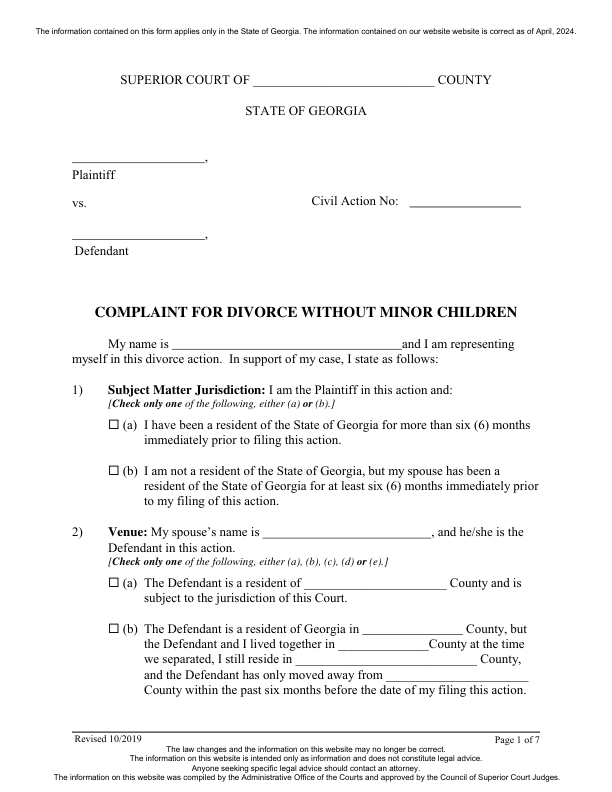
1 selected PDF is available. A selected opening petition or complaint is included. It is a working draft, not the complete filing packet. Only reviewed factual blanks transfer automatically; complete legal choices and other original questions in the downloaded PDF.
SELECTED FORMS
Documents in the current release
The app selects from this list using supported state, role and route facts. It does not add every listed document to every case. Read each original and all the limits below. Confirm this scope before paying for preparation.
This is a selected official form draft, not a complete filing packet. Review every answer and obtain the other required forms and local supplements. Legal requests, attestations, signatures, notarial acts, clerk issuance and proof of service are not automated. Only the reviewed factual fields transfer automatically. Complete every other original blank, legal choice and required attachment separately. No signature, oath, service event or court order is created.
Source conditions
Official model page states information was current as of April 2024; local clerk acceptance and current rules require confirmation.
Do not auto-select jurisdiction, venue, service, financial requests, grounds, pregnancy or name restoration.
Only unambiguous caption/full-name blanks are mapped; marriage-date alternatives are left manual because choosing a specific alternative is a legal/factual choice.
AUTOMATIC FACT TRANSFER
Enter common facts once; review every original question.
01
Answer factual questions
Provide legal names, your filing role, county, contact information and available marriage details. Unknown facts stay unresolved; the tool does not choose legal requests for you.
02
Review the selected document
Reviewed caption and other specifically mapped factual blanks receive the available answers. The source is not a complete guided questionnaire. Complete remaining legal choices and original blanks in the downloaded interactive PDF.
03
Find the rest of the packet
Use current official instructions for the petition if missing, confidential sheets, financial disclosures, summons or service, local orders, parenting, support, agreements and final papers.
04
Download and verify
Review all pages and required attachments. Leave signatures, oaths, notary, court and service-event blanks for the appropriate person and real event. Downloading a draft does not file a case.
BEFORE PURCHASE OR FILING
Confirm that this exact scope fits your situation
The listed opening document and remaining official packet match the intended procedure
The supported individual role, legal relationship and county match the actual case
This initial preparation route has no minor children; child-related routes and dependent-child questions need the appropriate official process
The correct court, current filing fee, local supplements and accepted filing method are confirmed
All remaining legal requests, financial schedules, attachments and printed assertions will be reviewed and completed manually
Every signature, notarization, oath, service event and court entry will reflect the appropriate person and an actual event
Current financial, local and final-judgment documents are obtained from the official packet
BEFORE FILING
Check your local requirements
Confirm the current forms, correct filing office and accepted filing method with the official court or clerk. A downloaded draft is not a filed case.
 Source preview